
How to Check Pending E-Challan Blacklist: Full Guide
Traffic Challans are issued to any individual who is found violating traffic rules, crossing the red light, speeding, not wearing a helmet, overlooking a sign, driving without a permit, etc., are a portion of the normal kinds of traffic police Challans. If your vehicle got an e-challan for breaking traffic rules and did not pay the e-challan, then your e-challan is added to the blacklist of pending challans.
We can check the pending or blacklist vehicle traffic e-challan online using the Parivahan website. If the vehicle has a pending challan, then don’t get an NOC (No Objection Certificate) for the vehicle. You must pay your pending vehicle challan. In this post to show how to check the pending e-challan or blacklist online.
How to Check Pending E-Challan Blacklist online?
You want to check the pending e-challan blacklist online for a vehicle, then first visit the Vahan Parivahan website: https://vahan.parivahan.gov.in. Open this website.
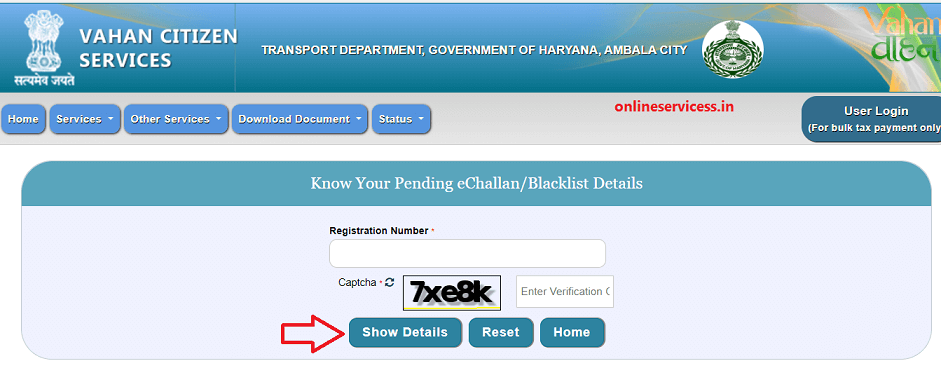
Now enter the vehicle number or registration number and the captcha code, then click on the Show Details button.
Show all pending challans of the vehicle on your screen and select it to pay.
What happens if you don’t pay the traffic e challan?
If you do not pay the traffic e-challan then you have to face the legal consequences. So always remember to pay your E-Challan. Can’t transfer the vehicle owner without paying the pending challan.

- Editor Staff
We have a strong background in digital publishing, SEO optimization, and content editing, with a focus on government services, transport, and online documentation guides.
- How to Find a Birth Certificate Online in Hyderabad October 10, 2026
- Download Birth and death Certificate Chennai Corporation October 9, 2026
- How to Apply for a Birth Certificate in Uttar Pradesh? October 6, 2026
- View Birth and Death certificate online on the Kolkata Municipal Corporation website October 5, 2026
- How to find birth and death certificates online in Jaipur (Guide) September 30, 2026