
How to Pay GRIPS Challan in West Bengal?
Anyone can pay Challan of GRIPS of West Bengal Online payment for all services through GRIPS (Government Receipt Portal System) online. Nowadays, all government services are online and transparent to use for the common man in West Bengal. The department has implemented the integrated “E-Challan” project to fully automate. A portal has been launched for you to make all payments online, whether it is for taxes or non-taxes payment. With the help of these services, you can deposit money directly into the state government’s account. All departments submit their challans here so that the management remains transparent and effective.
How to pay GRIPS challan in West Bengal?
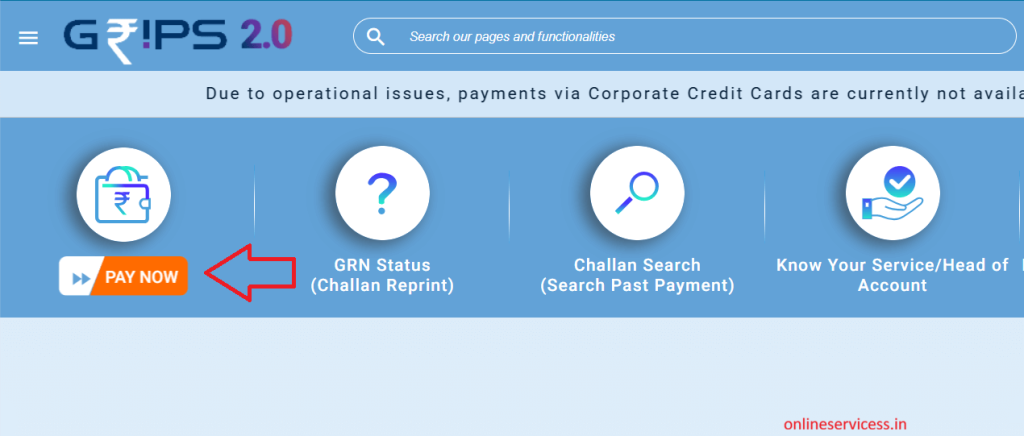
If you want to pay your GRIPS challan on the Grips website developed by the Government of West Bengal, then first, you will have to visit the GRIPS website wbifms.gov.in. after open page, select the Pay Now option and click it. Now, log in with your mobile number.
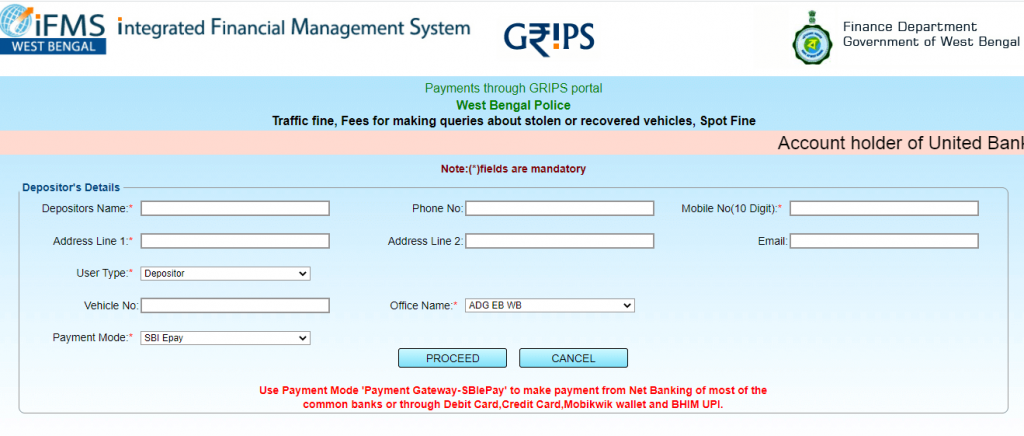
Now open the select service or department form and fill it to correct information
- Depositor’s Name:*
- Phone No:
- Mobile No(10 Digit):*
- Address Line 1:*
- Address Line 2:
- Email:
- User Type:*
- Depositor
- Office Name:*
- ADG EB WB
The last option is to select Payment Mode, any one select from the available options in your hand after clicking on the process button.
Now redirect to the payment page and pay your payment after success pay your payment, generate a reference number (GRN). Save this GNR number to check your e-challan payment status.
How to check GRN status in West Bengal ?
- First, will have to visit GRIPS website wbifms.gov.in.
- select GNR status option and click it.
- Now enter your GNR number
- Click the submit button
- Status appear on your screen

- Editor Staff
We have a strong background in digital publishing, SEO optimization, and content editing, with a focus on government services, transport, and online documentation guides.
- Instant e-PAN Card : Apply online And Download March 4, 2026
- How to Check Driving Licence Status - Steps by Steps guide March 2, 2026
- How to check Pan Card Status online? February 27, 2026
- Learner Licence Name Correction: Online & Offline February 25, 2026
- How to Pay GRIPS Challan in West Bengal? February 23, 2026
GRIPS WEB SITE BONDHO ACHEA ONEKDIN HOLO .KOBEA KHULBEA EKTU JANABEN PLESE.
W b coldstor licence fees e challan and markatin license fees