
Egras Haryana – Check status, verify stamp, generate stamp, GRN number
Egras : Online Government Receipts Accounting System (e-GRAS) is an e-Governance Initiative of the Government of Haryana. The Haryana government wants to make all government services easy to use and transparent to all people. Egras is very popular in Haryana because egras made many services, such as stamp paper, verify challan, verify payment, etc. If you want to check whether your stamp is original or not, you can check using egras Haryana website and more services are provided. e-GRAS facilitates the collection of tax/nontax revenue in both online and manual.
E-Graha Haryana offers many services online for the common man in the Haryana state. Below is a list of the many services offered on this website.
- Pay tax
- verify challan
- verify stamp
- verify payment
- forget GNR
How to check egras challan status in Haryana?
You were paid your tax, and you want to check the EGRAS challan status in Haryana, then first visit egras Haryana official website https://egrashry.nic.in/
Now select the bottom page to verify the challan option.
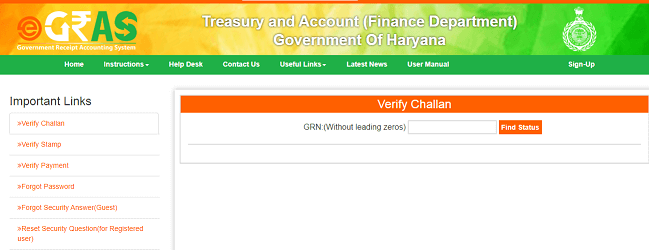
Enter your GNR number and click on Find Status
on screen, show your challan status.
How to stamp verification online in Haryana?
You can buy Stamp paper online, and India government make e stamp paper. egras offer to buy an e-stamp and make payment online. after will check if your payment is done or not.
- First, go to E-gras Haryana website https://egrashry.nic.in/
- Now select the verify stamp to bottom of the webpage
- Choose any one option stamp number or challan number
- Enter your stamp number and click on View Stamp Paper
- screen shows your stamp details
How to get GRN number in egras Haryana?
You forgot your GRN number, then don’t worry, EGRAS Haryana give a option to get GRN number.
First, go to E-gras website https://egrashry.nic.in/ and after open website, see the home page of E-Gras.
Scroll down the website and select forget GRN number option.
Enter the given details is Date of transaction, mobile number, and amount.
Click on submit button, now show your GRN number on your screen.
How to generate e-stamp paper at grapshry.gov.in
First need to login egrashry website and In case you want to purchase stamp paper, just click the “e-Stamp” option, fill in the relevant details, and answers to security questions and enter the security code to generate an e-Stamp. e-Stamp can be generated instantly in case of e-payment. Read this article to complete guide line to generate e-stamp paper https://egrashry.nic.in/instructions.html.
Refund of challan
Challan (GRN) Refund – There are two types of refunds :
1) Refund against Failure Transaction
2) Refund against Successful Transaction
How to refund challan, please read this PDF : https://egrashry.nic.in/PDF/Refund_Process_v1.pdf.

- Editor Staff
We have a strong background in digital publishing, SEO optimization, and content editing, with a focus on government services, transport, and online documentation guides.
- How to Find an ATS Center (Vehicle Fitness Test Center) Near You? September 8, 2026
- How to Download Birth and Death Certificates in Karnataka? September 5, 2026
- How to Search Birth Certificate by Name in Goa | Download death Certificate in Goa September 4, 2026
- Download Birth and Death Certificate in Rajasthan - Guide September 3, 2026
- Find Vehicle Owner details in Andhra Pradesh August 29, 2026