
Download Birth and Death Certificate Online in Andhra Pradesh
The Andhra Pradesh government has started the online facility for obtaining a birth certificate. Now, the citizens of the state can apply online to get the Andhra Pradesh Birth Certificate by going to the online portal through the Internet, sitting at home. The state government records the legal information, such as the date of birth of the child, date of birth, place of birth, name of parents, etc., in the authorised certificate. Along with this, it also certifies the occurrence of childbirth.
Table of Contents
Download Birth and Death Certificate in Andhra Pradesh
Birth registration has been done in the State of Andhra Pradesh as per the Birth & Death Registration Act and AP Birth & Death Registration ruling. Accordingly, every Birth is to be reported and registered within 21 days at the place of its occurrence in the prescribed reporting forms. In the state of Haryana, registration of birth and death of a person is done under this rule, so birth certificate of all citizens of the state is very important.
How to Marriage Registration Online in Andhra Pradesh ?
Required Documents For Birth Certificate in Andhra Pradesh
- Institutional Discharge Certificate
- Dr. Birth proof Certificate ( for non-institutional birth)
- Birth Report Form no. 1
- Application form
Existing fee and charges:
- Rs. 2/- for Delay Registration ( after 30 days)
- Rs. 5/- for Certificate fees
- Rs. 10/- for delay Registration ( after 1 years )
How to Download Birth Certificate Online In Andhra Pradesh
If you want to download birth certificate online in Andhra Pradesh then you first go to ubd.ap.gov.in website.
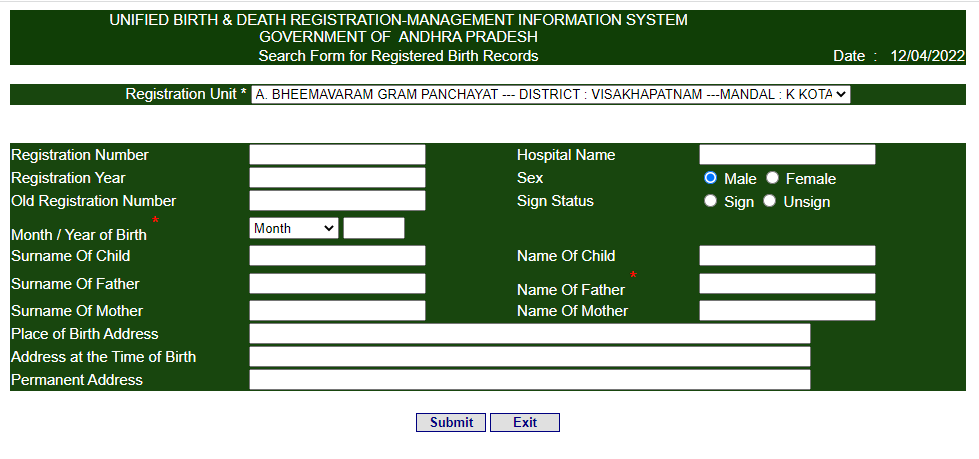
First, select the registration unit and other fields, such as a registration number, birth month and year, father’s name, name of child, and more.
Now click on the submit button to show your birth certificate details and print it or save.
How to apply for Birth Registration online in Andhra Pradesh?
If you want to do birth registration online in Andhra Pradesh, then you need to visit the Birth and Death Registration website Civil Registration system. Open this website and click on General Public Signup.
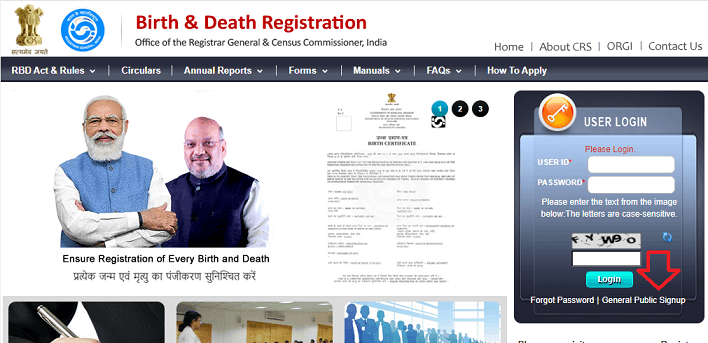
Now fill in all details such as Date of Birth, select your state Andhra Pradesh, District, Village name or city, etc.
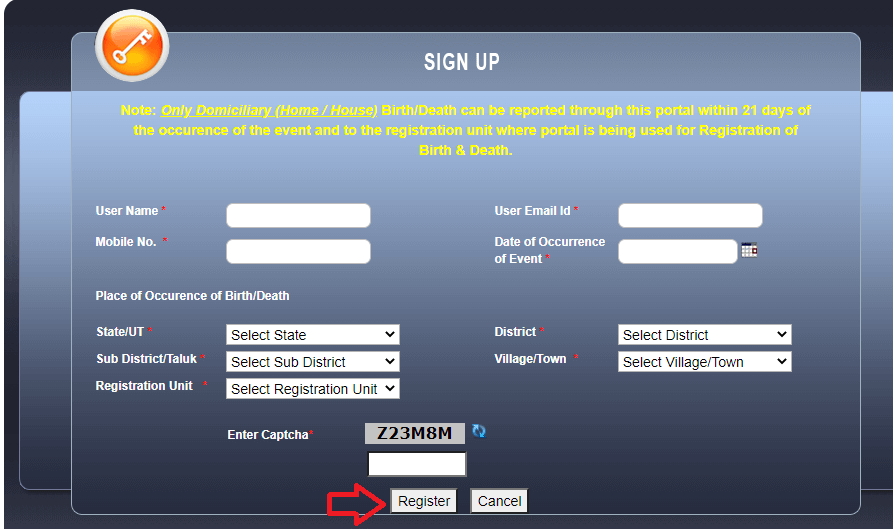
After filling everything, click on the register button. Now register the birth date and generate an acknowledgement number for further action. You will fill in all the information asked in the form, like date of birth, name of the child, name of the place where the birth took place, etc.
After filling all the information, you will have to attach all the documents along with the application form and submit it to your respective department. In this way, your application will be completed.
Download death certificate online in Andhra Pradesh
Death registration has been done in the State of Andhra Pradesh as per Birth & Death Registration Act and AP Birth & Death Registration Rules. Anyone can download a death certificate online in AP, in this post, we guide to how to download death certificate online.
How to Check Land Records in Andhra Pradesh ?
Required Documents For Death Certificate in Andhra Pradesh
- Institutional Death Certificate
- Dr. Death Proof Certificate ( for non-institutional death)
- Death Report Form No. 2
- Cause of Death Form No. 4
- Application form
- Burning Proof Certificate
How to Download Death Certificate Online In Andhra Pradesh
If you want to download a death certificate online in Andhra Pradesh, then you first go to ubd.ap.gov.in website.
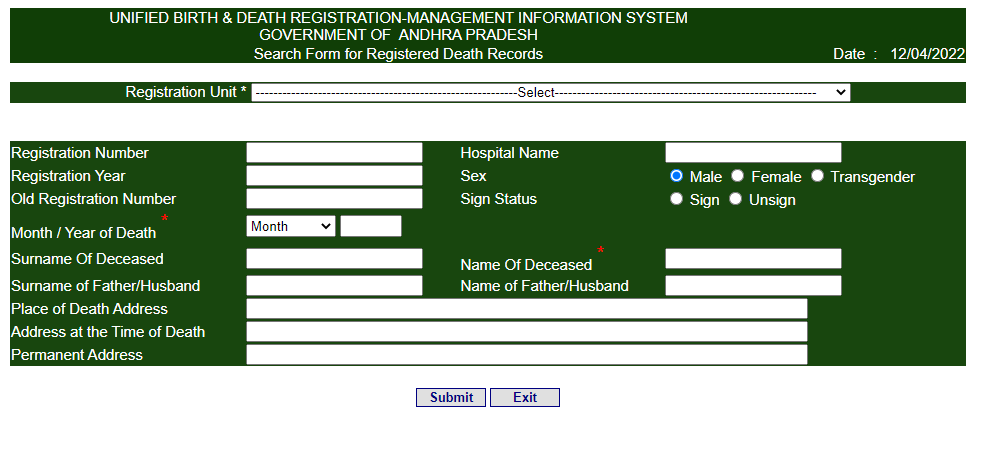
First, select the registration unit and other fields, such as a registration number, death month and year, father’s name, and more.
Now click on the submit button to show death certificate details and print it or save.
How to apply Death Certificate in Andhra Pradesh ?
If you want to death registration online in Andhra Pradesh, then you need to visit Birth and Death registration website Civil Registration system. open this website and click on General Public Signup.
Now fill in all details such as Date of Death, Village name, etc.
After filling in all details, click on the register button. Now register the death date and generate an acknowledgement number for further action. You will have to fill in all the information asked for in the form.
After filling in all the information, you will have to attach all the documents along with the application form and submit it to your respective department. In this way, your application will be completed.
Reference: Civil Registration System | Government of India

- Editor Staff
We have a strong background in digital publishing, SEO optimization, and content editing, with a focus on government services, transport, and online documentation guides.
- Download Birth/Death certificate Nagpur | NMC Birth Certificate Download October 19, 2026
- Download Birth Certificate online in Madhya Pradesh | Madhya Pradesh Death Certificate Download October 17, 2026
- Birth & Death Certificate Bihar: Apply, Download, Check status October 15, 2026
- Download Birth and Death Certificate in Odisha - Easy to Apply Online October 12, 2026
- How to Find a Birth Certificate Online in Hyderabad October 10, 2026